I recently read the excellent article “A Decade of Docker Container” by Anil Madhavapeddy, David J. Scott, and Justin Cormack. One thing I always enjoy when learning a tool is understanding the why: why it was created, what problem it solved, and which ideas made it possible. That article answers those questions for Docker and also traces the Linux primitives that made containers practical.
In this post, I want to visit different architecture components of Docker mentioned in the article. The idea here is to go a level deep in understanding Docker’s architecture and build a mental model of the container stack.
Docker
Docker provides a lighter-weight alternative to full virtual machines for running applications. Full VMs virtualize hardware and run a guest OS, while containers share the host kernel and isolate processes in user space.
Docker is a client-server application. dockerd acts as a daemon server that runs on the host machine. The docker CLI provides a easy way to interact with the Docker API to build image and run containers. Whenever you run a docker command for example, docker build or docker run, the CLI sends the request via RESTful Docker API to the dockerd daemon server.
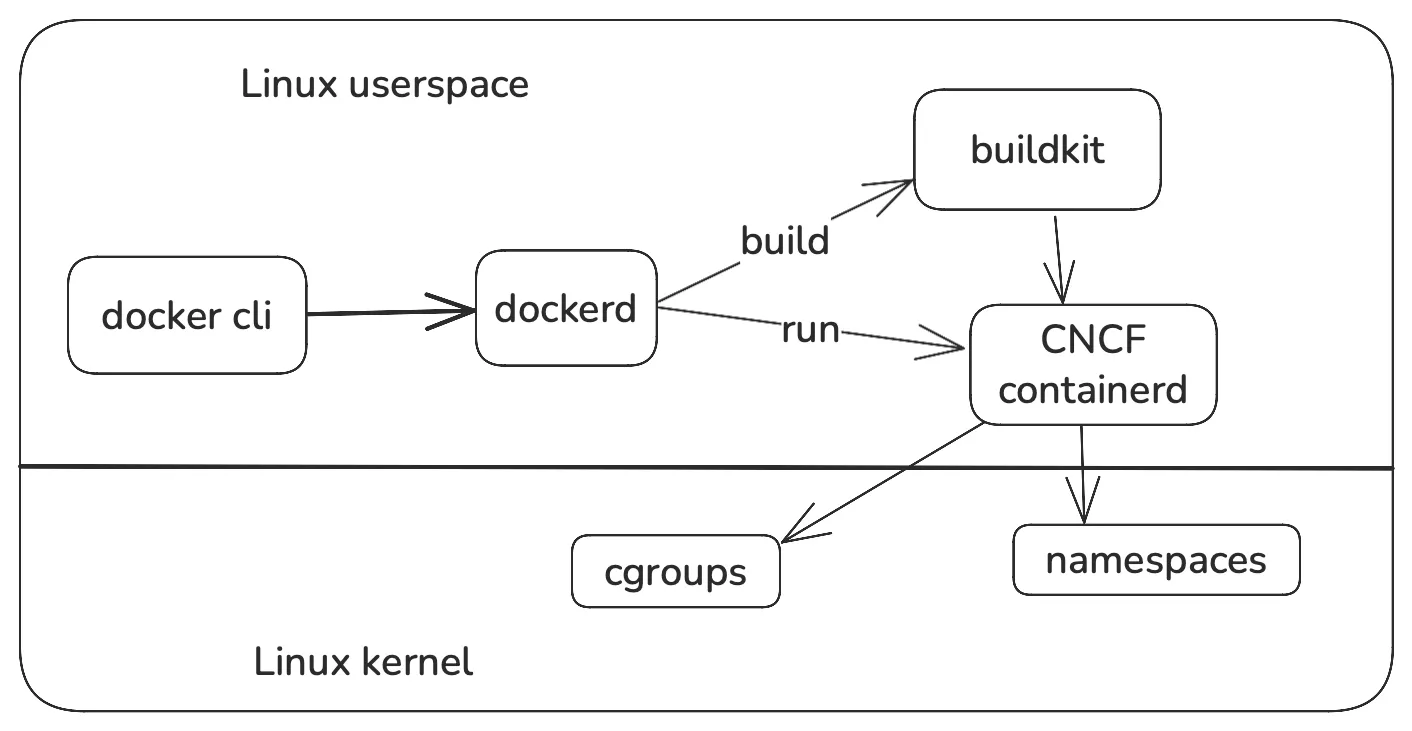
There are two main components for running application inside a container: building a image to create a container and running the container.
Build
A Dockerfile is a text file containing instructions for installing the dependencies, copying the application code and defining how the application should run. The docker build command builds an image using Dockerfile file to create a container. The result bundle (container) acts as a self-contained environment for running that application.
Underneath, Docker uses BuildKit builder that takes input configuration file (e.g. Dockerfile or yaml or toml) to create a final Docker image that contains our application. It speeds up the building process by caching, parallelizing execution and skipping unchanged stages.
BuildKit is Docker’s build engine. You can think of it as the system that takes a build definition, turns it into an internal dependency graph, executes that graph, and produces an artifact. Frontend A frontend takes a human-readable build definition and converts it into a Merkle Directed Acyclic Graph (DAG) called Low-Level Build (LLB), which is BuildKit’s intermediate representation. LLB is not tied to Dockerfiles. A Dockerfile is just one frontend that emits LLB. Other frontends can generate the same representation from YAML, TOML, or custom DSLs. For example, Mopyfile uses a YAML-based specification as an alternative to a Dockerfile. Low-Level Build (LLB) LLB is a binary, protobuf-based, content-addressable DAG that describes build operations and their dependencies. Each node in the graph represents an operation, such as loading a source image ( In Dockerfile terms, a Here is an interactive explorer for Dockerfile that shows the corresponding LLB operations. Output Once the LLB graph is produced, BuildKit executes it and exports the result in one or more output formats. Depending on the build, the output can be a container image pushed to a registry, a local directory, a Docker tarball, or an OCI tarball. This final artifact can then be distributed to users or deployed in other environments.What is BuildKit?
SourceOp) or executing a command (ExecOp). The edges represent dependencies between operations, which allows BuildKit to determine what can run in parallel and what must run sequentially.FROM instruction starts a new build stage, while instructions like RUN, COPY, and ADD are translated into LLB operations within that stage. Since the graph is content-addressable, the same operation with the same inputs produces the same cache key. This is the foundation of BuildKit’s caching model. The cache can be local or stored inline in the image or exported remotely to a registry (e.g. CI runners).
A Docker image is made up of immutable layers. Each layer is produced by a build instruction and stores only the filesystem changes relative to the previous layer. When you run a container from an image, Docker creates a unified filesystem view by stacking the image’s read-only layers (lower layers) and adding a writable container layer on top (upper layers). This layering model saves space because multiple images and containers can share the same lower layers while keeping their own isolated changes separately.
Under the hood, Docker uses a containerd image store to manage these copy-on-write layers. On Linux, this is commonly based on OverlayFS. There are advanced snapshotters such as stargz, which let Docker fetch image data lazily so containers can start before the full image is downloaded.
Open Container Initiative (OCI) is an organization that standardizes on the format for image, distribution and runtime. It defines the common standards that let container images be built, distributed, and run across different tools and platforms. So far, XKCD 927 has been avoided here.
There are three types of OCI specifications:
-
Image specification (
image-spec): The image spec defines the format of an OCI image: its manifest, optional image index, filesystem layers, and configuration. It standardizes how a container image is packaged so tools can build, distribute, and prepare it to run. -
Distribution specification (
distribution-spec): The distribution spec defines the API used to push and pull OCI content through registries. It standardizes how the content is distributed. -
Runtime specification (
runtime-spec): The runtime spec defines how a container should be configured and executed on a host system.
Run
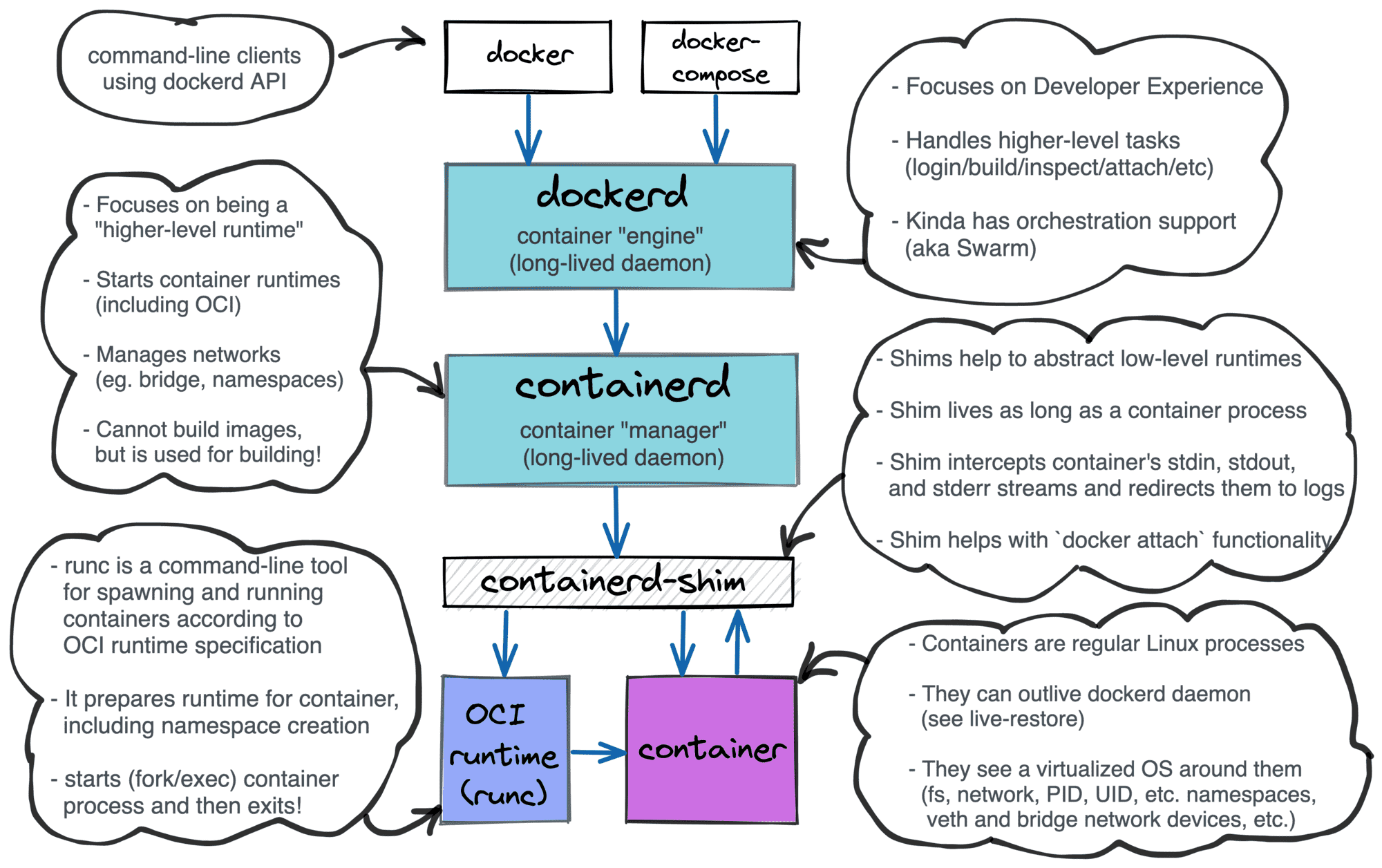
containerd is the container manager responsible for higher-level lifecycle operations such as creating, starting, stopping, and deleting containers.
containerd-shim is a small helper process that sits between containerd and the OCI runtime. Its job is to launch the runtime, keep track of the container process, and report status back to containerd.
On Linux, container isolation is built using kernel features such as namespaces and cgroups. Namespaces isolate what a container can see, such as its processes, network interfaces, and mount points. Cgroups control how much CPU, memory, and other resources the container can use.
containerd delegates the low-level task of setting up and starting the container process to an OCI runtime. OCI runtimes are responsible for starting, stopping, and managing container processes. Common OCI runtime implementations include runc, crun, and Kata Containers. These runtimes are responsible for creating the isolated execution environment and starting the containerized process using Linux kernel primitives.
Here is an example of runc implementation start command that under hood uses libcontainer that is responsible for making with kernel system calls.
A useful way to think about it is:
containerdmanages the container lifecycle- the OCI runtime sets up the isolated environment and starts the process
- the shim connects the two and keeps the container process supervised
This design makes it easier to support different OCI runtimes, because containerd interacts with the shim rather than depending directly on a specific runtime implementation.
In short, containerd manages what should run, while the OCI runtime handles how it runs.
I highly recommend the Implementing Container Manager series by Ivan Velichko for hands-on approach on implementing these components.
Docker Desktop
Docker was originally built around Linux kernel features, which made it a natural fit for Linux development and cloud environments. But many developers work on macOS and Windows, where Linux containers cannot run natively. Docker Desktop solves this by running a lightweight Linux environment (LinuxKit VM) on those platforms, while bundling Docker Engine, the CLI, networking, file sharing, and a GUI into a single application. Docker commands such as docker build and docker run are executed against that embedded Linux environment rather than directly against the host operating system.
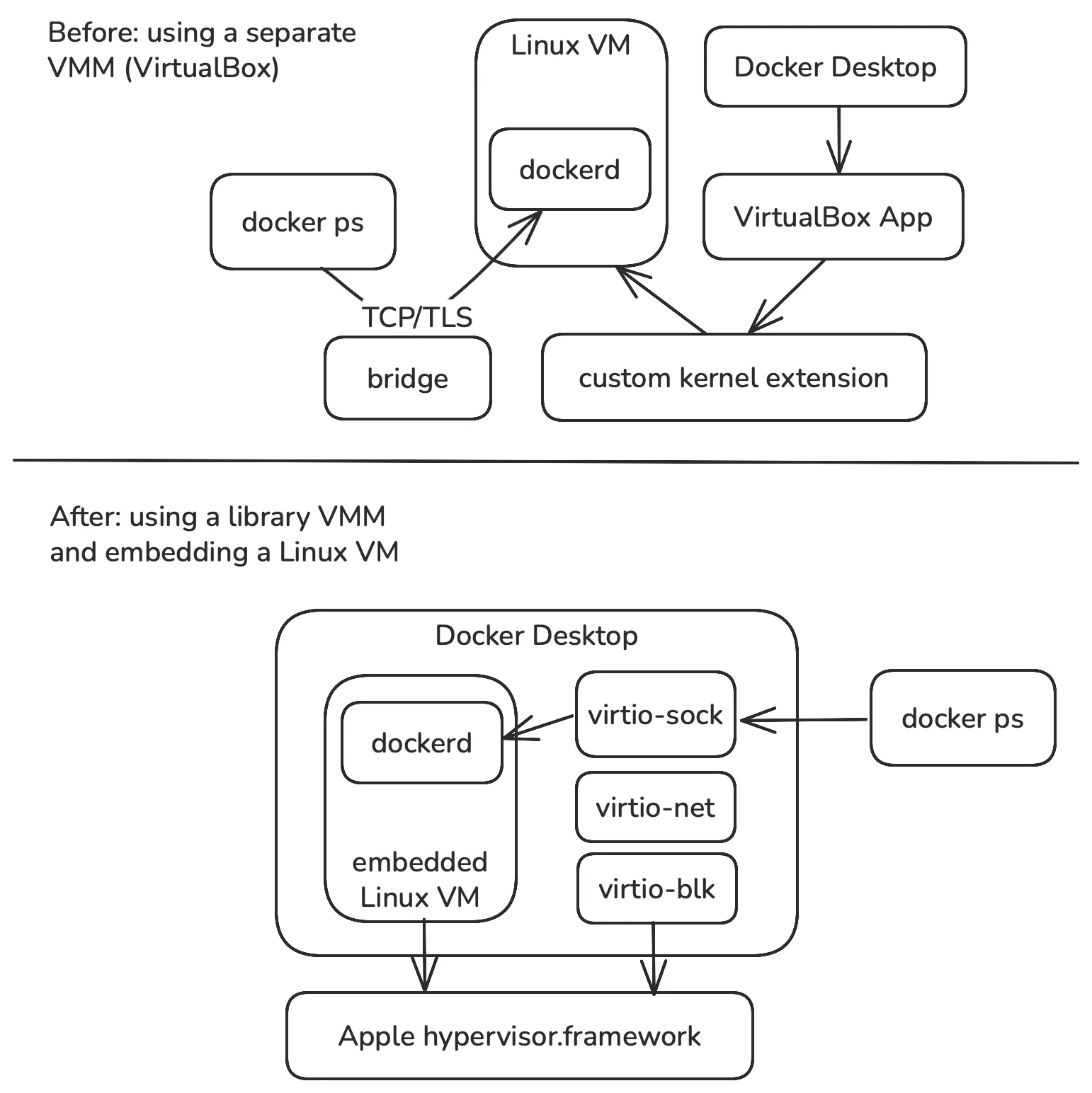
Traditional hypervisor (VM) vs Docker approach using VMM and Linux VM
The article provides technical challenges involved around minimizing application startup time, networking (how unikernels approach helped) and storage (translating Linux kernel calls to Windows or MacOS compatible). It’s so fascinating to see how these different challenges were addressed with unique solutions and developers don’t have to worry which operating system they are running on. It just works!
Kubernetes
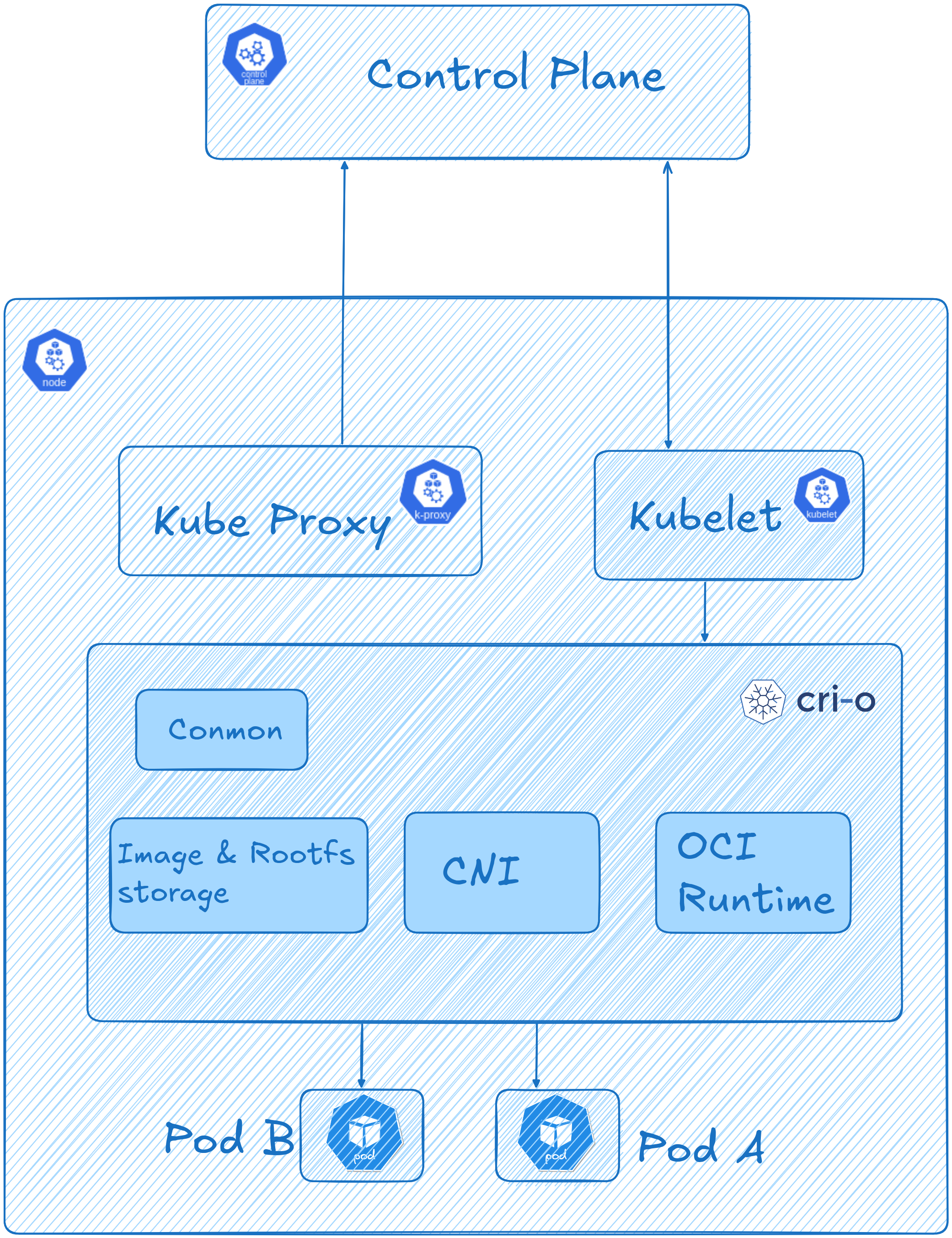
Kubernetes introduces higher-level abstractions such as Pods. To run those Pods on a node, the kubelet talks to a container runtime through the Container Runtime Interface (CRI) specification. Common CRI implementations include containerd and CRI-O. CRI-O is a Kubernetes-focused implementation of the CRI. It acts as the bridge between Kubernetes and an OCI-compatible low-level runtime such as runc or Kata Containers, which actually starts the containers.
Container Network Interface (CNI) is a separate specification and plugin system for configuring networking for Linux containers. In Kubernetes, CNI plugins are used to set up Pod network interfaces, IP addresses, routes, and related network resources. The container runtime must be configured to load the required CNI plugins.
Wrap up
This post is not meant to be a complete guide to Docker, BuildKit, containerd, or Kubernetes. I wrote it mainly to build a mental model of the main components in the container stack and show how they fit together. Each of these layers comes with its own complexity and can be explored much more deeply.