The other day I was listening to Signals and Thread podcast by Jane Street particularly the episode on “What is Operating System?” with Anil Madhavapeddy. There are many interesting topics discussed in the podcast. It changed how I think about virtualization particularly cloud VMs and introduced new concepts such as unikernels, kernel virtual machine (KVM), Virtual Machine Monitor (VMM), and micro VMs.
I am writing this post to update my mental model on how I think about different abstractions in various stacks outside and inside of a machine.
Anyone can easily provision a virtual machine on any of the cloud provider with few clicks. But have you thought what are different abstraction layers sitting between the provisioned virtual machine and the bare metal hardware?
This is how the stack looks like
Bare metal hardware (provider hardware)
  ↓
Hypervisors (provider)
  ↓
Virtual Machine (your instance)
  ↓
Guest OS (e.g. Linux in the VM)
  ↓
User space + container runtime (optional)
  ↓
Your Application
Hypervisors
Hypervisors allow multiple guest operating systems to run on a single machine. There are two types: type-1 hypervisors run directly on the bare metal server, and type-2 hypervisors run as an application on top of a host OS. It acts as a virtual machine host. This is the “virtualization platform” that lets many VMs share one physical host safely.
Each cloud provider implements their own hypervisor stack. For example, AWS uses Nitro hypervisor, Google Compute Engine offers VMs with a KVM hypervisor or Windows Hyper-V used by Azure as hypervisor system. Cloud providers run hypervisors to ensure isolation with other tenants running on the same underlying hardware.
Virtual Machine
Virtual machine are software-defined computer that feels like it is running on real hardware with its own CPU, memory, disk and network. You boot a normal OS inside another machine then run application on it as usual. In reality, hypervisor sits in between VM and bare hardware to provide virtual devices such as virtual disk, virtual CPU (vCPU), virtual memory. For example, a hypervisor usually exposes a virtual block device (disk). The guest OS builds a filesystem on top of it. Hypervisor acts a coordinator translating the requirement from VM to the underlying hardware.
Depending on the hypervisor design there are two common deployment styles:
- Type-2 (hosted): the hypervisor runs on top of a host OS. The host OS owns the hardware drivers, and the hypervisor uses the host OS to access disk/network/GPU.
- Type-1 (bare metal): the hypervisor runs directly on the hardware. There may still be a small/privileged management OS or partition for drivers and control, but the guest VMs are run more “directly” under the hypervisor
Either way the idea is: the guest OS thinks it owns a machine, while the hypervisor makes that illusion safe and shareable.
Operating system
Operating system is the software like a orchestrator that runs all the applications on the underlying hardware. A useful mental model is that an OS has two core parts:
- Kernel (privileged): The kernel is a critical progamming component that handles CPU scheduling, memory management, device drivers, filesystems, system calls, networking and much more. The most widely used kernel today is Linux kernel. The kernel runs in a privileged mode, meaning it can access hardware and all of physical memory.
- User space (restricted): This is where all the application (everything outside the kernel) programs that one uses daily such as Firefox or Zed run. Each program runs as its own isolated process, so that it can’t directly read or manipulate other processes’ memory. When a program needs hardware access (disk, network, etc.), it asks the kernel via system calls. This separation helps with safety and reliability: a buggy app is less likely to crash the whole machine.
Ubuntu/Fedora/Debian are “Linux distributions”: the Linux kernel + user-space tools + packaging.
Take for example, what happens when you want to send a file over the network,
- The kernel reads file data from disk into the page cache (kernel memory).
- A
read()system call copies bytes from kernel to user-space buffer. - A
write()/send()system call copies bytes from user-space to kernel memory, and the kernel/network stack later hands the data to the NIC to transmit.
There are new approaches such as zero copy implemented in the kernel. Zero-copy techniques reduce CPU copying by avoiding moving payload bytes through user space (often fewer-copy rather than literally zero in every path).
User space is where apps run without direct hardware access. The kernel is the privileged layer that mediates access via system calls. This approach ensures safety and reliability.
If you are a visual learner, this video is a great complement Where does the kernel end? by Core Dumped and likewise all other videos on the same channel.
Unikernels
Unikernels are modern equivalent of functional OS or library OS. A normal Linux VM boots a general-purpose OS image (kernel + user space + lots of drivers/services), which is powerful but also big. The Linux kernel alone is tens of millions of lines of code with a huge driver surface area.
Instead of shipping a general-purpose OS image (kernel + tons of drivers/services), you compile your application together with only the OS components it needs (network stack, storage, scheduler, etc.). Now when you build an application using these library OS components it provides kernel-like functionality in one image. This approach of unikernels reduces footprint and the attack surface compared to linux kernel.
Mirage OS is an example of unikernel framework. A real-world example: Docker Desktop application on Windows and MacOS implements on top of MirageOS networking libraries. This is clever design and curious readers can find more information in this blog on How Docker Desktop Networking Works Under the Hood for detailed information on the topic.
Unikernels don’t remove the hypervisor layer in the cloud (you still run on a hypervisor), but they can shrink what you run inside the VM. For example in normal VM here’s what the layers look like
bare metal → hypervisor → guest Linux kernel → user space → app
Unikernel
bare metal → hypervisor → app + library OS components
Bonus story from the podcast: The Bitcoin Piñata!. It was a 2015 bug-bounty experiment where the creators hid the private key to a 10 BTC wallet inside a MirageOS unikernel and invited hackers to break in and claim it.
The Bitcoin Piñata was a public stress test of the unikernel model: could a tiny MirageOS unikernel, with only its app and a minimal OCaml networking/security stack, survive real Internet attacks? Instead of testing a big Linux VM, it tested whether a much smaller, specialized attack surface could hold up in practice.
KVM
Kernel-based Virtual Machine (KVM) is built into the Linux kernel. With KVM, Linux can function as a hypervisor that runs VMs. In practice, KVM is the kernel-side virtualization engine. You still need a user-space Virtual Machine Monitor (VMM) (like Firecracker) to create/configure/start the VM and provide virtual devices.
A hypervisor is the core virtualization layer that runs and isolates guest CPUs/memory. A VMM is the user-space program that assembles the VM (allocates memory, wires up virtual devices, boots it). Some docs use “VMM” as a synonym for “hypervisor”, but in KVM-land, VMM usually means QEMU/Firecracker.
Micro VM
A microVM is a normal VM (guest kernel + root file system), but optimized to be lightweight: minimal device model, fast startup, low overhead, and a smaller attack surface.
Firecracker written in Rust is a user-space VMM that uses Linux KVM to create and manage these microVMs. Its design intentionally excludes lots of legacy devices/guest functionality present in traditional VMs to reduce footprint and improve isolation properties. Firecracker is used by AWS in production for serverless workloads like AWS Lambda and AWS Fargate.
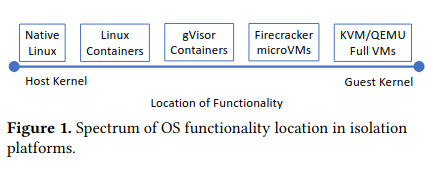
Blending Containers and Virtual Machines: A Study of Firecracker and gVisor paper
One way to compare isolation platforms is: where does operating system functionality live?
On the left, native Linux and containers rely heavily on the host kernel.
gVisor sits in the middle by inserting a user-space “application kernel” called the Sentry between the container and the host kernel. Instead of letting container syscalls hit the host kernel directly, gVisor intercepts many of them and re-implements large parts of the Linux syscall API inside the Sentry in Go language, so the host kernel sees a smaller/controlled interface. This can reduce the kernel attack surface for multi-tenant workloads (with some performance overhead).
Firecracker moves further toward the “VM end” of the spectrum because each workload runs with its own guest kernel, but it stays lightweight by emulating only a small set of modern virtual devices (instead of a full “PC” worth of legacy hardware like QEMU).
On the far right, full virtualization (KVM/QEMU) pushes most OS functionality into the guest OS and the QEMU process.
Take aways
- Containers isolate processes but share the host kernel.
- VMs isolate by running a full guest OS (guest kernel + user space).
- MicroVMs are still VMs, just optimized to be small and fast (minimal device model).
- Unikernels are an alternative style of guest image: application + library OS components instead of a general-purpose OS.
All these virtualization provide strong isolation but with a cost on performance. If you are interested to learn more about the history of virutualization, Xen project has an excellent chapter on the same topic.
Next steps for me would be creating some exciting projects using these technologies, get more hands on experience using and building cool projects.