Now that there is a pretrained dataset containing Python source code in form of text, next task would be to create a tokenizer specific to the code.
Tokenization
Tokenization is the process of converting text into a numerical representation that a model can process. The simplest possible encoding is mapping each character to its ASCII value:
>>> list("hello world".encode('ascii'))
[104, 101, 108, 108, 111, 32, 119, 111, 114, 108, 100]
ASCII works, but it is limited to 128 symbols. Modern text includes code comments, Unicode identifiers, and emojis. That’s where Unicode comes in.
UTF-8 is the dominant Unicode encoding today. One important property is ASCII compatibility: every ASCII character has the same numerical representation in UTF-8. But UTF-8 can also represent thousands of additional characters using 1-4 bytes per symbol. Each byte can represent 256 possible values (0-255). So if a character uses 4 bytes, that approximately 4.3 billion possible byte sequences. The Unicode standard today defines only about 149,000 characters.
>>> list("hello world".encode('utf-8'))
[104, 101, 108, 108, 111, 32, 119, 111, 114, 108, 100]

# encoding non-ascii characters
>>> list("π".encode("utf-8"))
[207, 128]
Tokenization is performed on these individual byte values as tokens, rather than treating characters or words as tokens. So what does tokenization on bytes mean? In byte-level tokenization (used by GPT-2, StarCoder, LLaMA models, etc.), the tokenizer first converts text into UTF-8 bytes. Then, the tokenization algorithms operate on the bytes rather than the original characters.
There are different levels of granularity of performing tokenization. Tokenization can be performed on character, word, sentence or sub-words. Character tokenization is simple and it avoid OOM issue but it has poor semantics working on only characters. Word or sentences on other hand capture the semantic units directly but require a huge vocabulary size and might lead to OOM issue. The sub-word tokenization approach provides a fine balance.
Several algorithms implement subword tokenization, including WordPiece, Unigram, and Byte Pair Encoding (BPE). We will be working with BPE. Note the byte-level and Byte don’t refer to the same thing. Here’s a brief intuition for BPE:
-
Start with a base vocabulary: If using byte-level BPE, the base vocabulary is simply the 256 possible byte values. If not using bytes, it can operate on any sequence of symbols (characters, phonemes, etc.).
-
Repeatedly merge the most frequent adjacent pairs: The algorithm scans the dataset and finds the most common pair of symbols (initially bytes) and merges them into a new token.
I highly recommend the Let’s build the GPT tokenizer video by Andrej Karpathy and the write up of the same video on the topic of training tokenizers from scratch.
Training tokenizer
Now that we have a lot of Python code (I’ll use the SwallowCode-v2 Python subset as the source dataset, the next step is to train a tokenizer.
The StarCoder2 paper follows the tokenizer design from StarCoder1, which in turn follows SantaCoder. SantaCoder describes their approach as:
We train a Hugging Face Tokenizer (MOI et al., 2022) using the Byte-Pair Encoding (BPE) algorithm on raw bytes with a vocabulary size of 49,152 tokens. This tokenizer was trained on 600,000 rows (Around 2.6 GB) of data - 200,000 for each language - which were pre-tokenized using a digit splitter and the default GPT-2 pre-tokenizer regex before being converted to bytes.
So the high-level recipe is:
- Choose an algorithm → byte-level BPE.
- Choose a vocabulary size → e.g. 30k–50k tokens.
- Sample a subset of your dataset → a few GB at most.
- Train a tokenizer on that subset using the 🤗 tokenizers library.
- Freeze the vocabulary and push it to the 🤗 Hub. The same tokenizer will be used for training and inference.
SwallowCode-v2 gives us ~16.1B tokens of Python code, which is far more than we need just to train the tokenizer. In practice, a random 1–5% slice of the data (on the order of 1–4 GB of text, or ~100M–500M tokens) is plenty to learn a good vocabulary, as long as it covers a variety of files, libraries, and coding styles. We don’t need as large a vocabulary as StarCoder2 (49,152 tokens). I think we can stick to 32_768 as our vocabulary size.
I wonder if there’s a good rule of thumb on choosing vocabulary size.
Implementation
🤗 Tokenizers library makes it easy to train a new tokenizer from scratch. The core is written in Rust, and the Python bindings let you kick off training from Python while Rust handles the heavy lifting and parallelization.
One of the immediate questions that comes up when training a tokenizer is: how do we evaluate it? Unlike models, tokenizers do not have an accuracy metric. Instead, we need to reason about efficiency, consistency, and alignment with the target domain. In the context of code, this includes questions like:
- How efficiently are indentation and newlines encoded?
- Are identifiers and keywords represented compactly?
- Does the tokenizer generalize well to unseen names and literals?
You don’t need a GPU to train the tokenizer. Training a tokenizer is almost entirely a CPU-bound text processing job.
The pipeline for training tokenizer is
- Dataset configuration
- Use Hugging Face streaming datasets to process large corpora without materializing them locally.
- This allows training on TB-scale datasets with constant memory usage. How cool is that?
- Tokenizer creation
- Use Byte Pair Encoding (BPE) as the tokenizer model (
models.BPE). - Construct a pre-tokenizer sequence with the following steps:
- Digit splitting (
pre_tokenizers.Digits): splits numbers into individual digits to improve numeric generalization. - GPT-2 pre-tokenization regex (
pre_tokenizers.Splitwith GPT-2 regex): provides soft boundaries for words, numbers, symbols, and whitespace. - Byte-level encoding (
pre_tokenizers.ByteLevel): converts text into UTF-8 bytes, enabling fully lossless tokenization
- Digit splitting (
- Apply Unicode normalization (
NFKC) to reduce vocabulary fragmentation caused by visually equivalent Unicode characters.
- Use Byte Pair Encoding (BPE) as the tokenizer model (
- Special tokens
- Reserve tokens for:
- End-of-text
- Fill-in-the-middle (FIM)
- Padding
- File and repository metadata
- While byte-level BPE theoretically does not require an
<unk>token, it is included for compatibility with common tooling.
- Reserve tokens for:
- Training
- Train the tokenizer using
BpeTrainer, configuring:vocab_size: maximum vocabulary sizemin_frequency: minimum frequency required for a token to be kept
- Train the tokenizer using
To better understand the behavior of the trained tokenizer, a lightweight evaluation suite is used with the following metrics:
- Compression ratio: Number of characters per token. Higher is generally better for efficiency.
- Fertility: Average number of tokens per word. Lower is generally better, though not always predictive.
- Indentation handling: Measures how many tokens are used to represent common indentation patterns (spaces, tabs, nested indentation). Note that with byte-level tokenization, whitespace is often merged, so this metric should be interpreted qualitatively rather than literally.
- Identifier tokenization: Token counts for common naming conventions: snake_case, CamelCase, SCREAMING_SNAKE_CASE
- Numbers: Evaluates how numeric literals are split and whether digits are handled consistently.
- Comments: Token counts and compression for single-line comments and docstrings.
- Special tokens: Verifies that all reserved tokens are present in the vocabulary.
- Python keywords: Ensures that Python reserved keywords are represented compactly.
- Baseline comparison (GPT-2): Compares average tokenized sequence length against the GPT-2 tokenizer. An NSL (normalized sequence length) below 1.0 indicates improved efficiency.
First run: baseline configuration
For the initial run, 1 million samples were used with the following configuration:
dataset:
  ...
  max_samples: 1_000_000 # number of samples to use for training

training:
  vocab_size: 32_768
  min_frequency: 2

output:
  ...
This run took approximately 6700 seconds (~2 hours) on a local machine with a 14-core Intel Core Ultra 7 CPU.
Result for first run
============================================================
TOKENIZER EVALUATION REPORT
============================================================
1. COMPRESSION RATIO
Compression Ratio: 3.04 chars/token
Interpretation: Higher is better. Code typically: 3-5

2. FERTILITY
Fertility: 2.35 tokens/word
Note: Lower is generally better, but not always predictive!

3. INDENTATION HANDLING
4_spaces            :  4 tokens (0 for indent)
2_spaces            :  4 tokens (0 for indent)
tabs                :  4 tokens (0 for indent)
nested_4            :  5 tokens (0 for indent)

4. IDENTIFIER TOKENIZATION
snake_case     : avg 5.0 tokens, 3.27 chars/token
CamelCase      : avg 2.0 tokens, 7.89 chars/token
SCREAMING      : avg 3.0 tokens, 3.44 chars/token

5. NUMBER TOKENIZATION
42        : ['4', '2'] ok
3.14159   : ['3', '.', '1', '4', '1', '5', '9'] ok
127       : ['1', '2', '7'] ok
0xFF      : ['0', 'xFF'] split_issue
1e-10     : ['1', 'e', '-', '1', '0'] ok
1000000   : ['1', '0', '0', '0', '0', '0', '0'] ok

6. COMMENT TOKENIZATION
Tokens:   6, Compression: 4.33
Tokens:   6, Compression: 5.00
Tokens:  12, Compression: 1.92
Tokens:   9, Compression: 5.00

7. SPECIAL TOKENS
<|endoftext|>       : present (ID: 0)
<|fim_prefix|>      : present (ID: 1)
<|fim_middle|>      : present (ID: 2)
<|fim_suffix|>      : present (ID: 3)
<|fim_pad|>         : present (ID: 4)
<|file_separator|>  : present (ID: 5)
<pad>               : present (ID: 6)
<unk>               : present (ID: 7)
<|repo_name|>       : present (ID: 8)
<|file_name|>       : present (ID: 9)

8. PYTHON KEYWORDS
False     : ['False'] tokens=1
None      : ['None'] tokens=1
True      : ['True'] tokens=1
and       : ['and'] tokens=1
as        : ['as'] tokens=1
assert    : ['assert'] tokens=1
async     : ['async'] tokens=1
await     : ['await'] tokens=1
break     : ['break'] tokens=1
class     : ['class'] tokens=1
continue  : ['continue'] tokens=1
def       : ['def'] tokens=1
del       : ['del'] tokens=1
elif      : ['elif'] tokens=1
else      : ['else'] tokens=1
except    : ['except'] tokens=1
finally   : ['final', 'ly'] tokens=2
for       : ['for'] tokens=1
from      : ['from'] tokens=1
global    : ['global'] tokens=1
if        : ['if'] tokens=1
import    : ['import'] tokens=1
in        : ['in'] tokens=1
is        : ['is'] tokens=1
lambda    : ['lambda'] tokens=1
nonlocal  : ['non', 'local'] tokens=2
not       : ['not'] tokens=1
or        : ['or'] tokens=1
pass      : ['pass'] tokens=1
raise     : ['raise'] tokens=1
return    : ['return'] tokens=1
try       : ['try'] tokens=1
while     : ['while'] tokens=1
with      : ['with'] tokens=1
yield     : ['yield'] tokens=1

9. BASELINE COMPARISON
Baseline (gpt2): current_avg_len=18.25, baseline_avg_len=24.25, NSL=0.752, improvement=24.8%
Second run: increasing min_frequency
In the second run, min_frequency was increased from 2 to 5 to reduce very rare BPE merges.
dataset:
  ...
  max_samples: 1_000_000 # number of samples to use for training

training:
  vocab_size: 32_768
  min_frequency: 5

output:
  ...
This run completed in approximately 6300 seconds (~1.75 hours). Comparing against the first run, there is no measurable difference in evaluation metrics, suggesting that rare merges were not significantly impacting performance for this dataset size.
Result for second run
 ============================================================
 TOKENIZER EVALUATION REPORT
 ============================================================

1. COMPRESSION RATIO
Compression Ratio: 3.04 chars/token
Interpretation: Higher is better. Code typically: 3-5

2. FERTILITY
Fertility: 2.35 tokens/word
Note: Lower is generally better, but not always predictive!

3. INDENTATION HANDLING
4_spaces            :  4 tokens (0 for indent)
2_spaces            :  4 tokens (0 for indent)
tabs                :  4 tokens (0 for indent)
nested_4            :  5 tokens (0 for indent)

4. IDENTIFIER TOKENIZATION
snake_case     : avg 5.0 tokens, 3.27 chars/token
CamelCase      : avg 2.0 tokens, 7.89 chars/token
SCREAMING      : avg 3.0 tokens, 3.44 chars/token

5. NUMBER TOKENIZATION
42        : ['4', '2'] ok
3.14159   : ['3', '.', '1', '4', '1', '5', '9'] ok
127       : ['1', '2', '7'] ok
0xFF      : ['0', 'xFF'] split_issue
1e-10     : ['1', 'e', '-', '1', '0'] ok
1000000   : ['1', '0', '0', '0', '0', '0', '0'] ok

6. COMMENT TOKENIZATION
Tokens:   6, Compression: 4.33
Tokens:   6, Compression: 5.00
Tokens:  12, Compression: 1.92
Tokens:   9, Compression: 5.00

7. SPECIAL TOKENS
<|endoftext|>       : present (ID: 0)
<|fim_prefix|>      : present (ID: 1)
<|fim_middle|>      : present (ID: 2)
<|fim_suffix|>      : present (ID: 3)
<|fim_pad|>         : present (ID: 4)
<|file_separator|>  : present (ID: 5)
<pad>               : present (ID: 6)
<unk>               : present (ID: 7)
<|repo_name|>       : present (ID: 8)
<|file_name|>       : present (ID: 9)

8. PYTHON KEYWORDS
False     : ['False'] tokens=1
None      : ['None'] tokens=1
True      : ['True'] tokens=1
and       : ['and'] tokens=1
as        : ['as'] tokens=1
assert    : ['assert'] tokens=1
async     : ['async'] tokens=1
await     : ['await'] tokens=1
break     : ['break'] tokens=1
class     : ['class'] tokens=1
continue  : ['continue'] tokens=1
def       : ['def'] tokens=1
del       : ['del'] tokens=1
elif      : ['elif'] tokens=1
else      : ['else'] tokens=1
except    : ['except'] tokens=1
finally   : ['final', 'ly'] tokens=2
for       : ['for'] tokens=1
from      : ['from'] tokens=1
global    : ['global'] tokens=1
if        : ['if'] tokens=1
import    : ['import'] tokens=1
in        : ['in'] tokens=1
is        : ['is'] tokens=1
lambda    : ['lambda'] tokens=1
nonlocal  : ['non', 'local'] tokens=2
not       : ['not'] tokens=1
or        : ['or'] tokens=1
pass      : ['pass'] tokens=1
raise     : ['raise'] tokens=1
return    : ['return'] tokens=1
try       : ['try'] tokens=1
while     : ['while'] tokens=1
with      : ['with'] tokens=1
yield     : ['yield'] tokens=1

9. BASELINE COMPARISON
Baseline (gpt2): current_avg_len=18.25, baseline_avg_len=24.25, NSL=0.752, improvement=24.8%
Third run: underscore-aware pre-tokenization
Building on the second run using 5 as min_frequency and making slight changes to how pre-tokenization is performed. An extra pre-tokenization step is added that is underscore aware pre-tokenization.
In Python, underscores play a central role in identifier structure (snake_case, dunder methods, constants). Explicitly exposing underscores as boundaries improves generalization while still allowing BPE to re-merge frequent patterns
self.tokenizer.pre_tokenizer = pre_tokenizers.Sequence(
            [
                # 1. Split digits: 123 → 1 2 3
                pre_tokenizers.Digits(individual_digits=True),
                # 2. Split underscores but KEEP them
+                pre_tokenizers.Split(
+                    pattern=Regex(r"_"),
+                    behavior="isolated",  # <-- critical
+                ),
                # 3. GPT-2 regex (words, numbers, symbols, whitespace)
                pre_tokenizers.Split(
                    pattern=Regex(gpt2_pattern),
                    behavior="removed",
                    invert=True,
                ),
                # 4. Convert to bytes
                pre_tokenizers.ByteLevel(add_prefix_space=False),
            ]
        )
Introducing underscore-aware pre-tokenization did not result in measurable improvements in compression, fertility, or identifier-level metrics on this dataset. This suggests that, given sufficient training data, byte-level BPE is already capable of learning underscore boundaries implicitly in Python code.
Result for third run
============================================================
 TOKENIZER EVALUATION REPORT
 ============================================================

1. COMPRESSION RATIO
Compression Ratio: 2.88 chars/token
Interpretation: Higher is better. Code typically: 3-5

2. FERTILITY
Fertility: 2.48 tokens/word
Note: Lower is generally better, but not always predictive!

3. INDENTATION HANDLING
4_spaces            :  4 tokens (0 for indent)
2_spaces            :  4 tokens (0 for indent)
tabs                :  4 tokens (0 for indent)
nested_4            :  5 tokens (0 for indent)

4. IDENTIFIER TOKENIZATION
snake_case     : avg 5.0 tokens, 3.27 chars/token
CamelCase      : avg 2.0 tokens, 7.89 chars/token
SCREAMING      : avg 3.0 tokens, 3.44 chars/token

5. NUMBER TOKENIZATION
42        : ['4', '2'] ok
3.14159   : ['3', '.', '1', '4', '1', '5', '9'] ok
127       : ['1', '2', '7'] ok
0xFF      : ['0', 'xFF'] split_issue
1e-10     : ['1', 'e', '-', '1', '0'] ok
1000000   : ['1', '0', '0', '0', '0', '0', '0'] ok

6. COMMENT TOKENIZATION
Tokens:   6, Compression: 4.33
Tokens:   6, Compression: 5.00
Tokens:  12, Compression: 1.92
Tokens:   9, Compression: 5.00

7. SPECIAL TOKENS
<|endoftext|>       : present (ID: 0)
<|fim_prefix|>      : present (ID: 1)
<|fim_middle|>      : present (ID: 2)
<|fim_suffix|>      : present (ID: 3)
<|fim_pad|>         : present (ID: 4)
<|file_separator|>  : present (ID: 5)
<pad>               : present (ID: 6)
<unk>               : present (ID: 7)
<|repo_name|>       : present (ID: 8)
<|file_name|>       : present (ID: 9)

8. PYTHON KEYWORDS
False     : ['False'] tokens=1
None      : ['None'] tokens=1
True      : ['True'] tokens=1
and       : ['and'] tokens=1
as        : ['as'] tokens=1
assert    : ['assert'] tokens=1
async     : ['async'] tokens=1
await     : ['await'] tokens=1
break     : ['break'] tokens=1
class     : ['class'] tokens=1
continue  : ['continue'] tokens=1
def       : ['def'] tokens=1
del       : ['del'] tokens=1
elif      : ['elif'] tokens=1
else      : ['else'] tokens=1
except    : ['except'] tokens=1
finally   : ['final', 'ly'] tokens=2
for       : ['for'] tokens=1
from      : ['from'] tokens=1
global    : ['global'] tokens=1
if        : ['if'] tokens=1
import    : ['import'] tokens=1
in        : ['in'] tokens=1
is        : ['is'] tokens=1
lambda    : ['lambda'] tokens=1
nonlocal  : ['non', 'local'] tokens=2
not       : ['not'] tokens=1
or        : ['or'] tokens=1
pass      : ['pass'] tokens=1
raise     : ['raise'] tokens=1
return    : ['return'] tokens=1
try       : ['try'] tokens=1
while     : ['while'] tokens=1
with      : ['with'] tokens=1
yield     : ['yield'] tokens=1

9. BASELINE COMPARISON
Baseline (gpt2): current_avg_len=19.25, baseline_avg_len=24.25, NSL=0.793, improvement=20.7%
Looking at the vocab, the tokenizer has picked up quite a lot of things related to Python
- Python internals:
__init__,setattr,IsADirectoryError - Scientific stack:
numpy,pandas,KFold,MaxPool - Infra/dev:
kafka,uvicorn,Docker,CELERY - Code syntax patterns:
"=\"\"\"","=[(","//","####"
The code repository also contains helper function to visualize the tokenizer output for the code. Here’s an example output for a Python code:
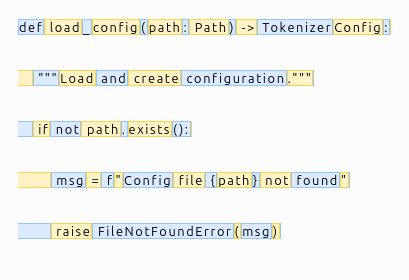
Each colored segment represents a single token. The visualization shows that the tokenizer segments Python code into meaningful subword units while preserving syntax, whitespace, and formatting losslessly.
Hugging Face hub link to the tokenizer: https://huggingface.co/dudeperf3ct/codellm-tokenizer
Future Improvements
- Perform exploratory analysis of the dataset itself (line counts, file sizes, domain diversity).
- Rewrite in Rust (why not?), 🤗 Tokenizers library is implemented in Rust.